
YouTube thumbnails that get the click, made with AI
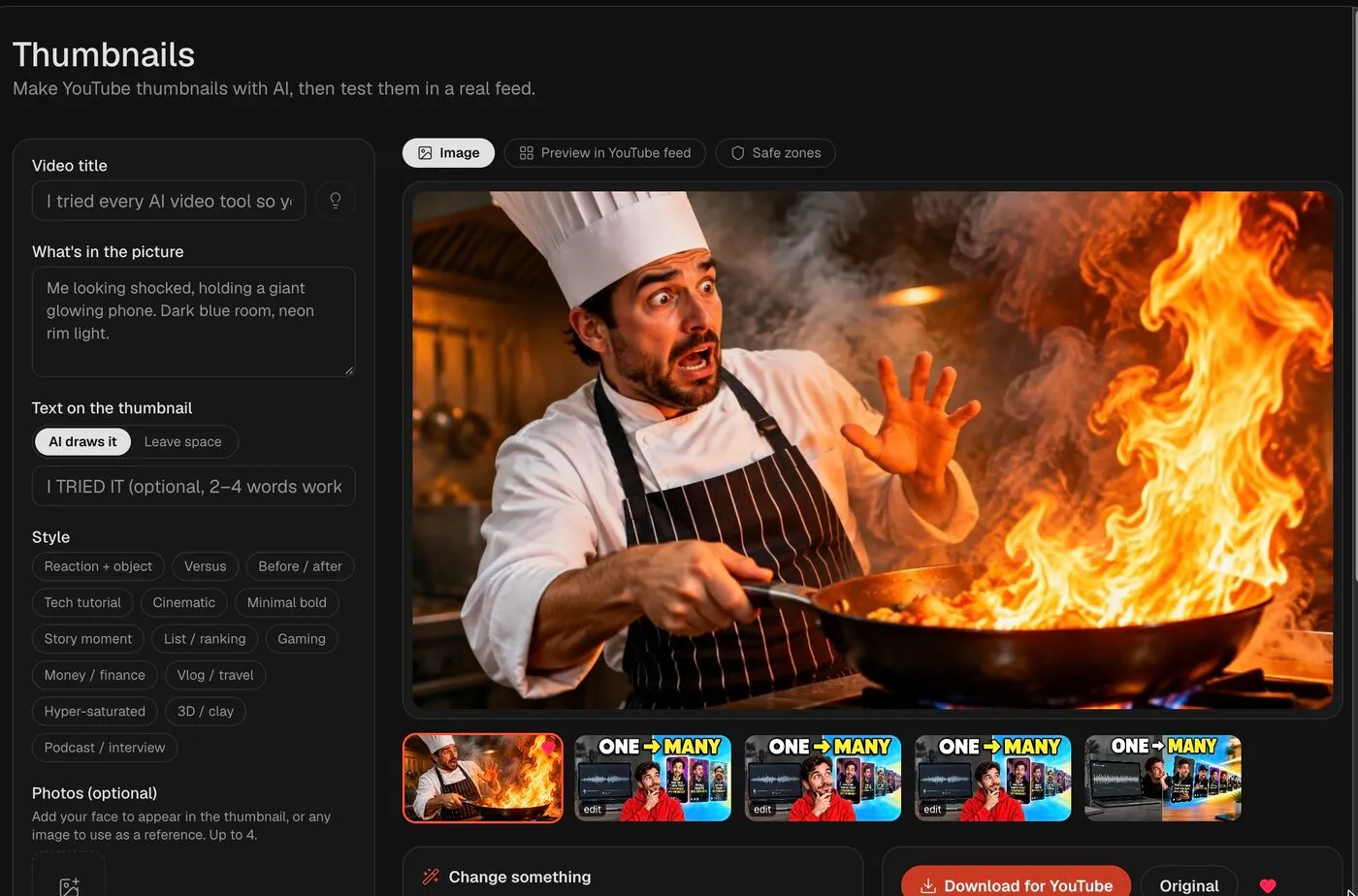
Type your video title, pick a style, add a photo of your face, and get up to four thumbnails in about 20 seconds. Each one is rated for contrast, legibility and phone size, and you fix it by describing the change.
From video to published — in four steps
Describe the video
Enter the title and what should be in the picture. Stuck? Short.now suggests three thumbnail ideas from the title.
Pick a style and add your face
Choose one of 14 styles, from reaction and versus to cinematic and podcast. Add up to four photos so the thumbnail shows you.
Compare in a YouTube feed
Get up to four variants, then preview them in a mock YouTube home feed next to competitor thumbnails, on desktop and phone.
Fix and download
Apply the AI rating's one-click fixes or type an edit like "make the text twice as big". Download a 1280 × 720 JPG under 2 MB, ready for YouTube Studio.
Everything you need, nothing you don't
14 proven styles
Reaction + object, versus, before/after, tech tutorial, cinematic, minimal bold, story moment, list, gaming, finance, vlog, hyper-saturated, 3D/clay and podcast.
Your face, from one photo
Add up to four reference photos, of yourself or a product, and they appear in the thumbnail instead of a stock face.
AI rating with one-click fixes
Every thumbnail is scored on focal point, contrast, legibility, phone size and curiosity, with a fix for each weak spot.
Edit by describing it
Write what to change and only that changes. Every version is kept, so you can go back to any earlier one.
Real feed preview
See your thumbnail among competitor videos in a YouTube home feed, search results and phone view before you upload.
Shorts thumbnails too
Switch to 9:16 to make vertical thumbnails for YouTube Shorts, and check them against the safe zones.
Common questions about AI YouTube Thumbnail Maker
No. Thumbnails are included in every paid plan: 60 a month on Starter ($6.99), 200 on Creator ($14.99) and 500 on Pro ($29.99). Every plan has a 3-day money-back guarantee. The free plan covers video clipping only.
It generates 16:9 images for regular videos and 9:16 for Shorts. "Download for YouTube" gives a 1280 × 720 JPG under 2 MB, which uploads from both YouTube Studio on a computer and the mobile app.
Yes. Upload up to four photos as references. A clear, well-lit photo of your face works best; you can also add a product or logo.
Canva is a general design editor: you start from a template or a prompt and finish the design yourself. Short.now is built only for YouTube: it generates the thumbnail from your title, scores it on the things that decide clicks, and shows it in a YouTube feed so you can compare before uploading.
Yes. Type a change such as "switch the background to bright orange" or use a one-click fix from the rating. Only the part you describe changes, and earlier versions are kept.
Make your next thumbnail in 20 seconds
Thumbnails are included in every paid plan, along with AI clipping, captions and auto-publishing.
Start making thumbnails