
Free Online Video Editor, Right in Your Browser
Cut and arrange clips on a multi-track timeline, add text, captions, music, effects and transitions, then export an MP4. No watermark and no account. Your files never leave your computer.
Free, no sign-up, no watermark. Works best in Chrome or Edge on a computer. Your saved projects
What you can do with it
Multi-track timeline
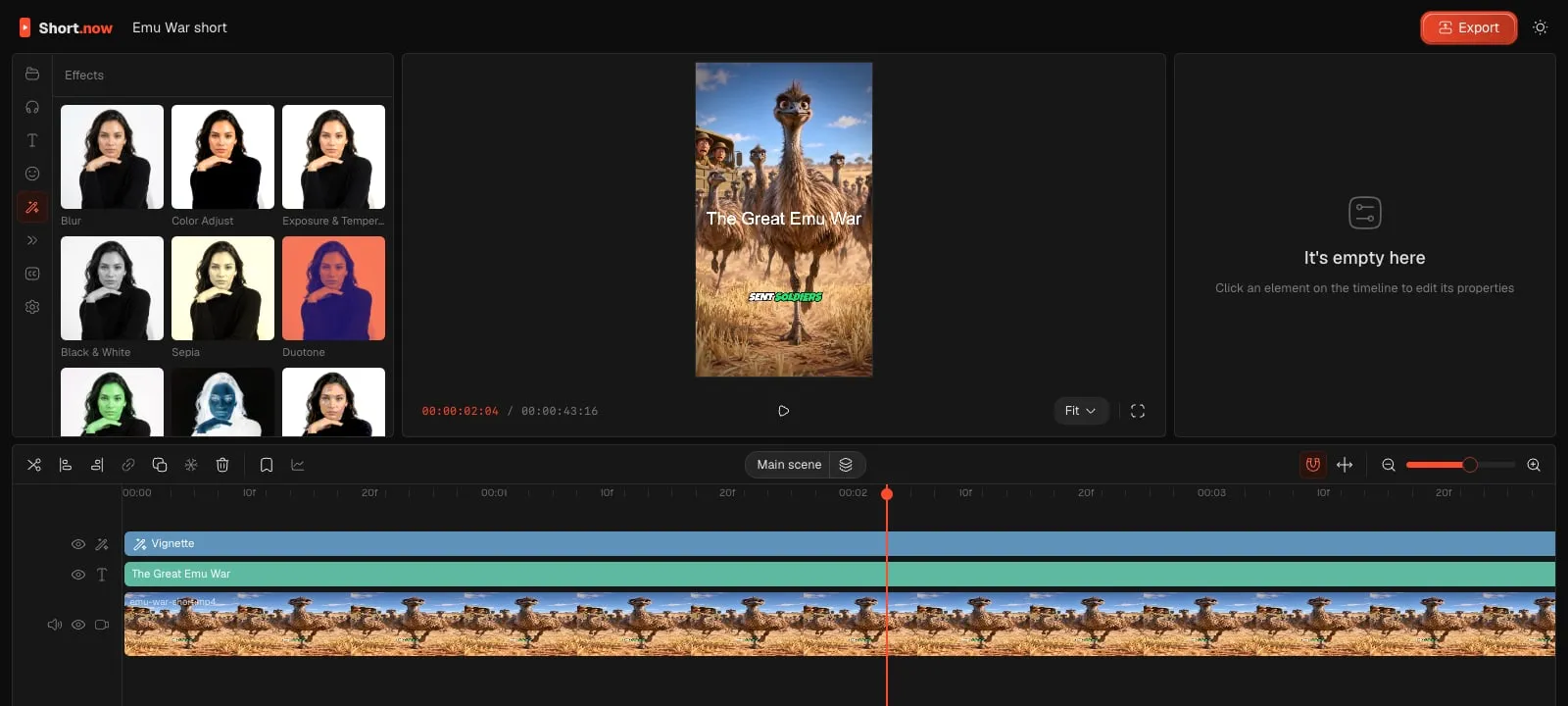
Stack video, images, text, stickers and audio on as many tracks as you need. Split, trim, ripple-delete and snap clips to each other.
Text and captions
Add titles in any Google font, or generate captions from speech. Transcription runs in your browser, so the audio is never uploaded.
17 effects
Color adjust, black and white, duotone, vignette, glow, pixelate, RGB split, film grain, glitch and more. Every setting can be keyframed.
12 transitions
Fade, slide, zoom, pop, spin, blur, whip pan and drop. Put one on the start, the end or both ends of a clip and pick the duration.
Keyframes and masks
Animate position, scale, rotation and opacity with a curve editor. Cut shapes out of a clip with feathered masks.
Export without a watermark
Render to MP4 or WebM on your own device. Vertical, square or wide: the canvas takes the size of your first clip, or set it yourself.
How to edit a video online
-
Open the editor
Press Open the editor. It starts a new project in a new window. Projects are saved in your browser, so you can close the tab and come back.
-
Add your media
Drop videos, photos and audio files on the Media panel, then press the plus on a clip or drag it to the timeline.
-
Cut and arrange
Move the playhead and press S to split. Drag clip edges to trim, and drag clips between tracks to layer them.
-
Add text, effects and transitions
Pick a tab on the left. Effects go on their own track and affect everything under them. Transitions apply to the clip you have selected.
-
Export
Press Export, choose MP4 or WebM and the quality, and the file downloads when it is ready.
Why nothing is uploaded
Most online editors send your footage to a server, edit it there and send it back. That is slow for big files and means your video sits on someone else’s computer. This editor does the work in your browser instead: decoding, effects and rendering run on your own graphics card through WebGPU.
Your media is stored in your browser’s private storage for this site. Clearing site data removes it. To move a project to another computer, export the video and keep your source files.
The editor is based on OpenCut, an open-source editor released under the MIT license, with Short.now styling and extra effects and transitions.
Video Editor or Short.now?
They do different jobs. Use the editor to finish a video by hand. Use Short.now when you have a long video and want many shorts from it.
| Free Video Editor | Short.now | |
|---|---|---|
| Best for | Editing one video by hand | Turning long videos into many shorts |
| Finds the best moments | No, you pick them | Yes, AI picks them |
| Reframes to 9:16 | Manually | Automatically, with face tracking |
| Captions | Generated in the browser, styled by hand | Generated and styled for you |
| Where it runs | In your browser, nothing uploaded | In the cloud |
| Price | Free, no watermark | Free plan, paid plans for more |
Editing a long video into shorts by hand?
Short.now finds the strongest moments in a podcast, stream or webinar, reframes each one to 9:16 with face tracking and adds captions. You review clips instead of cutting them.
Questions
Yes. There is no trial, no watermark and no account. The editor runs in your browser, so there are no server costs to pass on.
No. Files stay on your device and are stored in your browser’s storage for this site. Caption transcription also runs locally. The speech model is downloaded once, and your audio is not sent anywhere.
A recent Chrome or Edge on a laptop or desktop works best, because they support WebGPU. Other browsers fall back to WebGL, which is slower. Phones and tablets are not supported yet.
Yes. The canvas takes the size of the first clip you add, so a vertical clip gives you a 9:16 project. You can also set the size in the Settings tab.
Import the video, image and audio files your browser can play, such as MP4, MOV, WebM, JPG, PNG, MP3 and WAV. Export to MP4 or WebM.
In your browser, on this computer. They are still there when you come back, unless you clear the site’s data. They do not sync between devices.


