
In this lesson (9 sections)
Key takeaways
- Record one long piece a week (a podcast, a lesson, a stream) and treat it as the raw material for every short you post.
- A 30 to 60 minute talk-heavy recording usually gives 5 to 8 clips worth posting. That is enough for one short a day on every platform.
- Split the work into four separate jobs: record, clip, package, schedule. Doing each one in its own session is what makes it fast.
- Post the same clip on all three platforms as a clean file you made, and link Shorts back to the full video.
- Every month, look at which clips won and let that decide what you talk about in the next long recordings.
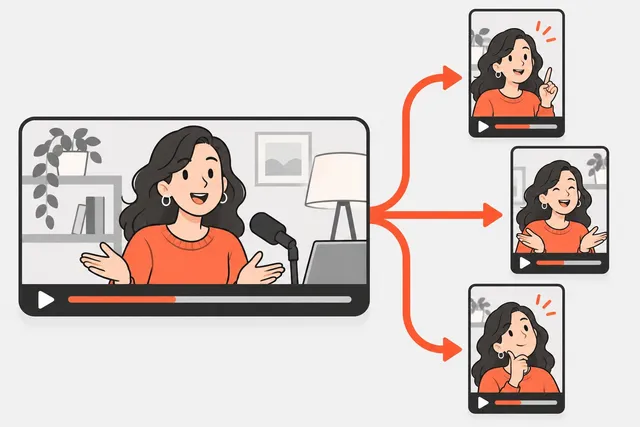
A content repurposing system means you record one long piece of content a week, cut 5 to 8 short clips from it, and post those clips across YouTube Shorts, TikTok and Instagram Reels over the following days. Four recordings a month give you 20 to 30 clips, which is one short a day on every platform without filming anything extra.
This lesson shows you how to set that up: which long format to pick, how to split the week, how the numbers work out, and how to use your results to choose what to record next.
How the system works
Think of it as a waterfall. One big piece at the top feeds many small pieces below it.
| Level | What it is | How many per week |
|---|---|---|
| Pillar | One long recording: podcast, tutorial, stream, talk | 1 |
| Clips | Self-contained 20-90 second moments cut from it | 5 to 8 |
| Posts | Each clip uploaded to Shorts, TikTok and Reels | 15 to 24 |
| Extras | Quotes, a newsletter, a community post | Optional |
The pillar is where your real thinking happens. The clips are where most people find you. The two feed each other: clips bring viewers to the long video, and the long video gives you an endless supply of clips.
You can run this system on one platform and add the others later. Start where your audience already is.
Pick a pillar format you can keep up
The best pillar is the one you will still be making in month six. Here is how the common formats compare for clipping:
| Format | Clip yield | Effort to make | Good for |
|---|---|---|---|
| Interview podcast | High | Medium (need a guest) | Stories, opinions, disagreements |
| Solo talk or Q&A | Medium to high | Low | Experts, coaches, teachers |
| Tutorial or screen share | Medium | Medium | Software, skills, how-to |
| Live stream | Low to medium | Low to film, high to sort | Gaming, community, reactions |
Talk-heavy formats clip best because every answer is a potential unit. A slow tutorial with long silent stretches clips worst. Our post on how many shorts you can get from one long video breaks the yield down by format.
Record with clipping in mind
You do not need to script for clips, but a few habits double your yield:
- Answer in full sentences. “The biggest mistake new runners make is…” works as a clip. “Yeah, that one” does not.
- Restate the question. If a guest asks something, repeat it in your answer so the clip makes sense on its own.
- Make one point at a time. Finish a thought before starting the next.
- Use numbers and names. “I lost 3 clients in one week” is clippable. “Things went badly” is not.
- Look at the camera for the big lines. You will want those as hooks.
- Leave a one-second pause before and after strong points. It gives you clean cut points.
The weekly cycle
The trick is to split the work into four jobs and never mix them. Each job uses a different part of your brain, and switching back and forth is where the hours go.
| Day | Job | Time | Output |
|---|---|---|---|
| Monday | Record the pillar | 60-90 min | One long video |
| Tuesday | Clip: find moments, cut, reframe, caption | 60-120 min manual | 5-8 vertical clips |
| Wednesday | Package: titles, captions, hashtags, covers | 30-45 min | A filled-in sheet |
| Thursday | Schedule everything for the next 7 days | 20-30 min | A full week queued |
The days are only an example. What matters is that the clip session is not also the writing session.
One more rule: stay one week ahead. The clips you post this week should come from last week’s recording. That way a sick day or a bad recording never leaves you with nothing to post. For the details of filming and editing in batches, see batch content creation.
The math: from one recording to a month
Talk-heavy content usually gives about 1 to 2 good clips per 10 minutes. That gives you a simple plan:
| Weekly recording | Clips per week | Clips per month | What that covers |
|---|---|---|---|
| 20 minutes | 2-4 | 8-16 | 3-4 shorts a week |
| 45 minutes | 5-8 | 20-32 | 1 a day |
| 90 minutes | 9-15 | 36-60 | 1-2 a day, plus a buffer |
Because the same clip goes to Shorts, TikTok and Reels, 25 clips become 75 posts. You do not need a new clip per platform.
Tip
Do not post every clip you cut. Post your best 5 or 6 from each recording and park the rest in a "buffer" folder. On weeks where the new recording is weak, pull from the buffer.
Same clip, three platforms
You can post one clip everywhere, but do it properly:
- Export one clean master file at 1080x1920, with your own captions burned in. Never download your TikTok and re-upload it to Instagram: the file carries TikTok’s watermark and looks like a repost.
- Upload natively to each app rather than sharing a link.
- Write the caption per platform. A searchable title on YouTube, a short line plus a few hashtags on TikTok, a slightly longer caption on Instagram. Module 6 covers this in detail.
- Check length. YouTube treats square or vertical videos up to three minutes as Shorts. TikTok and Instagram have their own limits, and the specs cheat sheet keeps them on one page.
Reusing your own material is not the problem some creators fear. YouTube’s monetization policy on reused content targets content taken from others without meaningful changes, and it lists “content that primarily features the uploading creator” as an example of what is allowed. Repurposing other people’s videos is a different matter and needs their permission.
Link the shorts back to the long video
On YouTube, a Short can carry a related video link that shows under your channel handle in the Shorts player. You add it in YouTube Studio: Content, open the Short, choose a related video from your channel, save. YouTube says this needs advanced feature access, and the linked video must be public or unlisted.
If you make a Short with YouTube Studio’s own Clips and Shorts tool (open a long video in Studio, then Clips and Shorts, then Create clip or Short), the source video is added as the related video automatically, unless the Short is private, unlisted or made for kids. On TikTok and Instagram, mention the full episode in the caption or a pinned comment and point to the link in your bio.
Manual or with a tool
You can run this whole system by hand. A typical manual clip session for a 45-minute recording looks like this:
- Watch or skim the transcript and mark 10 to 15 candidate moments (30-45 min).
- Cut the best 6, reframe them to 9:16, add captions (45-90 min).
- Export and name the files (10 min).
The next two lessons teach those steps: how to find clip-worthy moments and how to turn horizontal video into vertical.
There are faster options. YouTube Studio’s Clips and Shorts tool lets you pick a segment by selecting text in the transcript, adds auto-captions where available, and in some countries and languages offers AI suggestions. An AI clipper like Short.now does the find, cut, reframe and caption steps for the whole recording at once and hands you a ranked list to review, which turns the clip session into a 15-minute review. Either way, you still choose what gets posted.
Review once a month and feed the next recording
Once a month, spend 20 minutes with your analytics:
- Rank the month’s clips by views and by average percentage watched.
- Note the top three topics and the top three opening lines.
- Spot the losers. If every clip that starts with a long setup dies, start later in the moment next time.
- Pick next month’s pillar topics from the winners. A clip that does well is a cheap test; the topic behind it has earned a full episode.
Write this down in one place, even a note on your phone. After three months you will have a clear picture of what your audience wants, and your long recordings will get better, which makes your clips better. Module 6 shows which numbers to look at on each platform.
What’s next
The whole system depends on picking the right moments. In the next lesson, how to find clip-worthy moments in a long video, you will learn the stand-alone test, a fast transcript scan and how to judge AI suggestions.
Practice
Do it now: plan your first repurposing month
- Pick your long format: a weekly podcast, a tutorial, a live stream or a solo talk. Choose the one you can keep up for 3 months.
- Write down 4 topics, one for each week of next month. Under each, list 3 questions or claims you want to cover.
- Block 4 slots in your calendar: record (60-90 min), clip (60 min), package (30 min), schedule (20 min).
- Open the clip cadence planner, enter how many clips you expect per recording, and see how many days a week that covers.
- Pick a folder name pattern now, for example 2026-11-W1_topic, so every clip from a recording stays together.
Check yourself
Lesson quiz
4 questions. Get 3 right to complete the lesson. Your progress is saved in this browser.
Questions people ask
Content repurposing means taking one piece of content you already made, such as a podcast episode or a long YouTube video, and turning it into other formats. For short-form creators that mostly means cutting vertical clips from a long recording and posting them on YouTube Shorts, TikTok and Instagram Reels.
Yes, when it is your own content. Export one clean file yourself and upload it to each app, rather than downloading a post from one app (with its watermark) and re-uploading it to another. Write a caption that fits each platform.
YouTube's reused content policy is about content taken from other creators or other online sources without meaningful changes. Its own examples of allowed content include content that primarily features the uploading creator. Policies change, so read the current monetization policy page if you are in or applying to the Partner Program.
Most creators post 4 to 8 per recording and spread them over one to three weeks. Posting all of them in two days makes your feed feel repetitive, and you lose the buffer for slow weeks.
Sources
Practice on your own videos
Short.now turns one long video into ready-to-post Shorts, TikToks and Reels with captions. Free plan, no watermark, no card.
Try Short.now free